Configuring kubernetes cluster is not easy. If you proceed with original method – installing all services manually and configuring all TLS certs with old methods. That’s why we use kubeadm to create kubernetes cluster.
I’m going to configure them with oracle virtual box and ubuntu 22.04
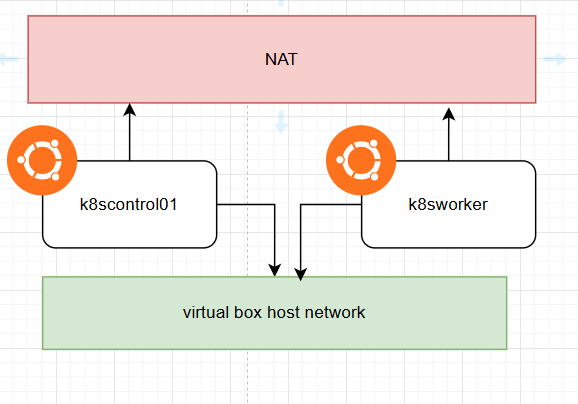
The basic concept for test lab is like this. We are going to use kubernetes network connected to virtual box host network. Both nodes are going to use NAT network to communicate with internet.
After configuring VMs, You need to configure things before installing kubeadm.
#Disabling firewall
sudo ufw disable

# Disable swap memory
free -h
swapoff -a
sed -i '/ swap / s/^/#/' /etc/fstab

# Setting timezone
sudo timedatectl set-timezone "Asia/Seoul"
sudo timedatectl set-ntp true
sudo systemctl restart systemd-timesyncd.service

# configuring modprobe overlay, br_netfilter
# loading overlay, br_netfilter kernel modules
# overlay module is used for container filesystem overlay
# br_netfilter is the module for filtering bridge network, which filters and send network packets between host and virtual network interfaces.

cat <<EOF | sudo tee /etc/modules-load.d/k8s.conf
overlay
br_netfilter
EOF

sudo modprobe overlay
sudo modprobe br_netfilter

# Enable iptables kernel
# net-bridge.bridge-nf-call-iptables let iptables to handle bridge traffic
# net.ipv4.ip_forward enables ip packet transfer
cat <<EOF | sudo tee /etc/sysctl.d/k8s.conf
net.bridge.bridge-nf-call-iptables  = 1
net.bridge.bridge-nf-call-ip6tables = 1
net.ipv4.ip_forward                 = 1
EOF

# apply sysctl parameter without restarting
sudo sysctl --system
So these are the requirements for preparing kubernetes cluster.
<to be continued>
 YJS Virtual Tech Blog
댓글 남기기